

Hover to zoom
Stock
SKU: NPTPL-RE200
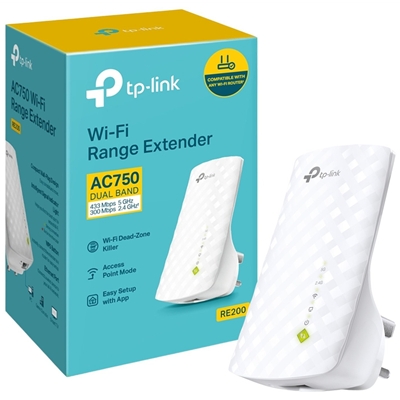
TP-Link RE200 AC750 Dual Band Wi-Fi Universal Wall-Plug Range Extender
£35.86
£29.88 ex. VAT
Secure checkout
Brighton-based experts
Pre-tested products
Product Details
Features
Boosts wireless signal to previously unreachable or hard-to-wire areas flawlessly.
Creates a Mesh network by connecting to a TP-Link OneMesh router for seamless whole-home coverage.
Compatible with 802.11 b/g/n and 802.11ac Wi-Fi devices
Dual band speeds up to 750 Mbps
Miniature size and wall-mounted design make it easy to deploy and move flexibly
Ethernet port allows the Extender to function as a wireless adapter to connect wired devices
Boost Your WiFi Network to Cover hard-to-reach Areas
Place the RE200 between your wireless router and wireless devices, expanding WiFi coverage while eliminating WiFi dead zones. Enjoy a seamless wireless network throughout your home or office. The dual bands WiFi up to 750Mbps not only help extend to 2,000 sq.ft. (185 m2), but also make good use of your high ISP speed — ideal for HD video streaming, online gaming and other bandwidth-intensive tasks.
AC750 WiFi for Compatible Connections
The RE200’s Wireless AC technology create stronger WiFi connections across your home. Work with any standard router or access point, making it convenient to provide wide, non-dropping Dual Band WiFi to multiple devices.
WiFi keeps Strongest for Unlimited Moving
With TP-Link Mesh Technology, it’s easy to form a Mesh network with a single WiFi name for seamless whole home coverage. Just connect RE200 to a OneMesh™ router. Always enjoy the strongest WiFi when you’re walking around with no need to search around for a stable connection.
Enjoy a Mesh Network with Your Existing Router
Want a Mesh network? Hesitate on whether to replace your existing router and buy a Mesh set?
TP-Link OneMesh resolves your dilemma.
One Key Connection
Press the WPS button on your router and RE button on your RE200 within 2 minutes to easily connect to the network. Once connected with an existing router, you can simply relocate the RE200 at any location for the best signal strength.
Smart Signal Indicator
Smart signal lights indicate the signal strength received from the existing router. Read the lights to find the best location for your RE200.
Entertainment Adapter
With an Ethernet port, RE200 can function as a wireless adapter to connect wired devices like desktop, gaming consoles, Blu-ray players, and Internet TVs. At the same time, the device can share the wireless network as well.
Specifications
WIRELESS
Working Modes
Range Extender/Access Point
HARDWARE FEATURES
Standards and Protocols
IEEE802.11ac,IEEE 802.11n, IEEE 802.11g, IEEE 802.11b
Plug Type
EU, UK, US, AU
Interface
1 x 10/100Mbps Ethernet Port (RJ45)
Button
RE (Range Extender) Button, Reset Button
Input Power
100-240V~50/60Hz
Max. Power Consumption
About 6.5W
Dimensions ( W x D x H )
4.3x 2.6 x 3.0in. (110.0 x 65.8 x 75.2mm)
Antenna
3 x internal
WIRELESS FEATURES
Wireless Standards
IEEE 802.11a/n/ac 5GHz, IEEE 802.11b/g/n 2.4GHz
Frequency
2.4GHz & 5GHz
Signal Rate
5GHz:Up to 433Mbps
2.4GHz:Up to 300Mpbs
Working Modes
Range Extender/Access Point
Reception Sensitivity
2.4G:
270M: -70dBm@10% PER
130M: -70dBm@10% PER
108M: -73dBm@10% PER
54M: -75dBm@10% PER
11M: -86dBm@8% PER
6M: -92dBm@10% PER
1M: -94dBm@8% PER
5G:
390M: -60dBm@10% PER
29.3M: -83dBm@10% PER
180M: -64dBm@10% PER
13.5M: -87dBm@10% PER
78M: -68dBm@10% PER
6.5M: -90dBm@10% PER
54M: -75dBm@10% PER
6M:-90dBm@10% PER
Wireless Modes
Range Extender/Access Point
Wireless Functions
WMM (Wi-Fi Multimedia)
Wireless Statistic
Domain Login Function
Wireless Security
64/128/152-bit WEP
WPA-PSK / WPA2-PSK
Transmission Power
< 20 dBm (EIRP)
Mesh Technology
OneMesh
OTHERS
Certification
CE, FCC, RoHS
Package Content
AC750 Wi-Fi Range Extender RE200
Quick Installation Guide
System Requirements
Microsoft Windows 98SE, NT, 2000, XP, Vista or Windows 7, 8, 10, Mac OS, NetWare, UNIX or Linux.
Environment
Operating Temperature: 0C~40C (32F~104F)
Storage Temperature: -40C~70C (-40F~158F)
Operating Humidity: 10%~90% non-condensing
Storage Humidity: 5%~90% non-condensing